
Choice Eliminator 2 not working? Move your form in 5 minutes
Choice Eliminator 2 is no longer in the Google Workspace Marketplace. Its listing doesn't open and it's missing from search (checked 12 October 2026), so the links in older tutorials go nowhere. If your sign-up form depended on it, you can move it to Audeza Choice Sync and keep every place that's already taken.
What changes
Choice Eliminator 2 kept your limits in its own sidebar settings. Audeza Choice Sync keeps them in a Google Sheet: one column for the choices and, if they differ, one column for the limits. You edit the sheet to add a slot or change a limit, and the form follows.
Counting works the same way. The add-on reads the form's responses, counts how often each choice was picked, and removes the ones that are full.
Before you start: get the full list back
This is the step people miss. Choice Eliminator 2 removed full choices from the question, so the question now shows only what was still open. You need the original list, including the full ones.
- Copy the choices still showing in the question.
- Open the responses spreadsheet (Responses tab, then the green Sheets icon) and copy the taken choices from that question's column.
- Paste both into one column of a new sheet, with a header in row 1 such as
Workshop. Remove duplicates. - If choices had different limits, put the numbers in the next column, for example
Seats.
The text has to match the old choices exactly, letter for letter. That's how the add-on matches existing responses to rows. Extra spaces at the ends don't matter.
Move the form
- Install Audeza Choice Sync from the button on this page. It's free.
- In your form, open Add-ons (puzzle icon), then Audeza Choice Sync, then Open, and click Link.
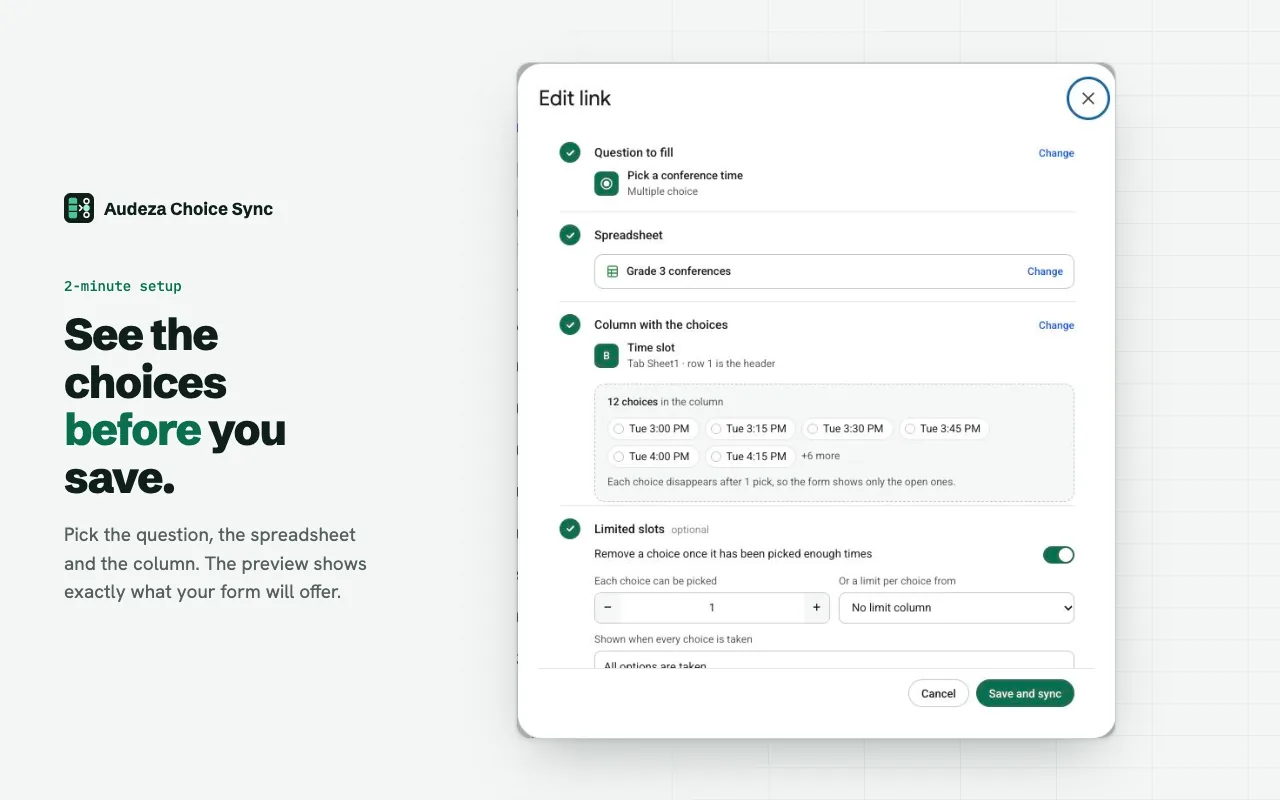
- Pick the question, the spreadsheet and the choice column. The preview shows the list.
- Turn on "Remove a choice once it has been picked enough times". Set one number for all, or pick your limits column.
- Click Save and sync. Full choices disappear right away, because the responses you already have count.
If Choice Eliminator 2 still opens on that form, turn it off for the question first, so two add-ons don't edit it at once.
Check it worked
Open the form's preview (the eye icon). The full choices should be gone. The sidebar's run log shows the sync as "updated". Delete a test response and click Sync now: its place comes back.
Other choice eliminators
Search the Marketplace for "choice eliminator" and you'll find about 45 add-ons, some with "Choice Eliminator 3" or "4" in the name. Pick on what matters for your form. Audeza Choice Sync is built around a sheet and around not failing quietly:
- A different limit per choice, from a column.
- If the sheet comes up empty or a header is renamed, the question keeps its choices and you get an email. It's never wiped.
- It only opens the spreadsheets you pick, not your whole Drive.
Questions
Can I still install Choice Eliminator 2?
No. Its Google Workspace Marketplace listing no longer opens and it doesn't appear in search (checked 12 October 2026). Old tutorials and links lead nowhere.
Will people who already signed up lose their place?
No. The add-on counts the responses the form already has, so a slot that was taken before the switch stays taken, as long as the choice text in the sheet matches the old choice exactly.
Is Choice Eliminator Lite the same thing?
Choice Eliminator Lite removes a choice after one pick. If you need two families per slot or 12 seats per workshop, you need a limit per choice.
Is it free?
Free for up to 3 linked questions per form, with limits, alerts and the run log included. Pro removes the limit for $49 a year or $6 a month.