
Dynamic dropdowns in Google Forms, filled from a Google Sheet
A Google Forms dropdown keeps whatever options you typed into it. To make it follow a list that changes, like names, products or rooms, keep the list in a Google Sheet column and let Audeza Choice Sync copy it into the question.
Why the dropdown doesn't update by itself
Google Forms stores a question's choices inside the form. There's no option to point a question at a range of cells, so when the list changes in your sheet, the form keeps the old one until someone edits it. You have two ways to automate that: write an Apps Script, or use an add-on.
Option 1: an Apps Script you maintain
If you're comfortable with code, a short script can copy a column into a dropdown. In your form, open the three-dot menu, then Apps Script, and paste:
function updateDropdown() {
  var form = FormApp.getActiveForm();
  var sheet = SpreadsheetApp.openById('YOUR_SHEET_ID').getSheetByName('Sheet1');
  var values = sheet.getRange('A2:A').getDisplayValues()
    .map(function (row) { return row[0].trim(); })
    .filter(String);
  var item = form.getItems(FormApp.ItemType.LIST).filter(function (i) {
    return i.getTitle() === 'Pick a team';
  })[0];
  item.asListItem().setChoiceValues(Array.from(new Set(values)));
}
Run it once to grant access, then add a time-driven trigger (Triggers, Add trigger, Time-driven) so it runs every hour. It works, with some costs:
SpreadsheetAppasks for access to every spreadsheet in your Drive, not just this one.- If someone renames the question or the tab, the script stops with an error. You hear about it from Google's failure digest email, or from a respondent who can't find their option.
- One script per form. Copy the form and you set it up again.
Option 2: Audeza Choice Sync, no code
- Put the options in a sheet column. One per row. Row 1 can be a header.
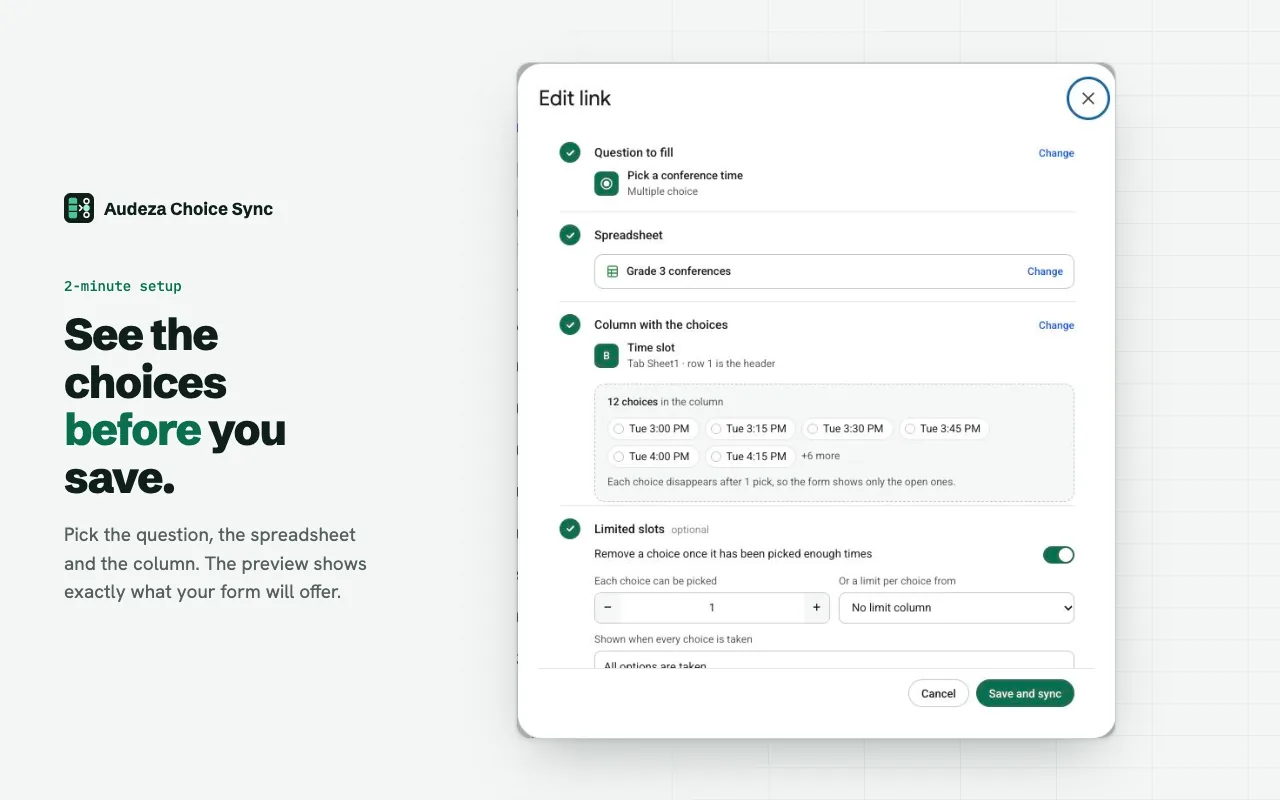
- Open the add-on in your form. Click the puzzle icon, then Audeza Choice Sync, then Open, and click Link.
- Pick the dropdown question. Then pick the spreadsheet in Google's file picker and the column. The add-on can open only the files you pick.
- Save and sync. The dropdown now matches the column.
From then on the add-on syncs after every response, every hour, and when you click Sync. Blank cells and duplicates are skipped. If a sync fails, for example because a header was renamed, the question keeps its current options and you get an email that says what broke.
The same link works on multiple choice, checkbox and grid questions, not only dropdowns. Each linked question can read a different column or a different sheet.
Remove options once they're taken
A dynamic list often has a second rule: an option should go away once enough people pick it, like a shift, a seat or a topic. Turn on limited slots in the link dialog and set how many times each option can be picked, or point to a column with a number per row. See choice eliminator for Google Forms.
Questions
Can a Google Forms dropdown update itself from a sheet?
Not on its own. Google Forms has no setting that ties a question to a spreadsheet. You need an Apps Script or an add-on that rewrites the choices when the sheet changes.
How often do the choices update?
After every form response, every hour, and whenever you click Sync in the add-on. The add-on can't react to a sheet edit the instant it happens, so a new row shows up at the next of those.
Can one dropdown depend on another?
No. Google Forms shows every choice of a question regardless of earlier answers, and Audeza can't change that. The closest workaround is sections: route people to a different section, each with its own dropdown, based on an earlier answer.
How many options can a dropdown have?
Google Forms accepts up to 1,000 choices per question. Audeza skips blank cells and duplicates, so the count is the number of distinct values in the column.
Can I use a formula to build the list?
Yes. The add-on reads what the cells show, so a column built with =SORT(UNIQUE(...)) or =FILTER(...) works. Change the source data and the dropdown follows at the next sync.
Free for 3 linked questions per form, with every feature. Pro removes the limit for $49 a year or $6 a month.